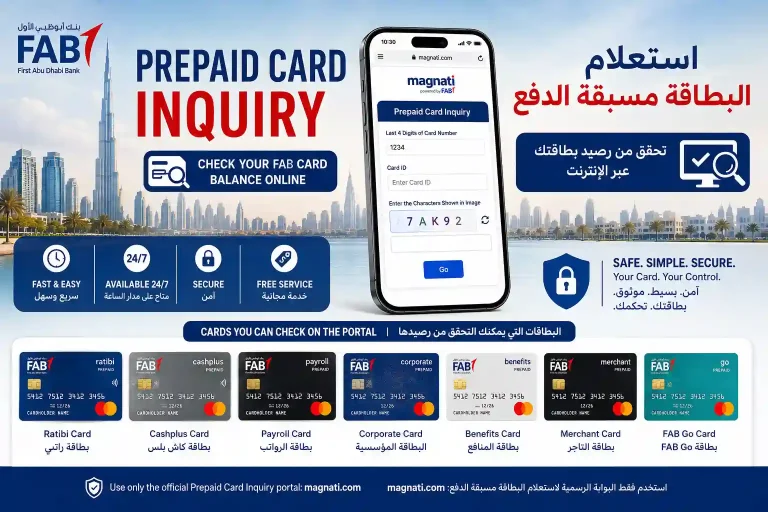
How to Activate FAB Ratibi Salary Card
You just received your FAB Ratibi salary card from your employer. Before you can withdraw your salary, check your balance or make any payment, you need to activate it. FAB Ratibi card activation is completely free and takes just a few minutes.
This guide covers every activate FAB Ratibi salary card method available in 2026, with exact steps for each one. The most reliable method for all WPS salary card and FAB prepaid payroll card types is the FAB ATM.
What You Need to Activate FAB Ratibi Salary Card?
Have these ready before you begin the Ratibi card activation process:
What If Your FAB Ratibi Card Arrived Damaged?
If the card you received is physically damaged, has a scratched chip or is unreadable at the ATM, do not attempt to activate it. Contact your employer or HR department straight away.
Quick Comparison of Ratibi Card Activation Methods
Method | Time Needed | Internet | Reliability | Best For |
|---|---|---|---|---|
FAB ATM | 5 minutes | No | High | All card types, most reliable |
Payit App | 10 to 15 min | Yes | High | Smartphone users |
FAB Branch | 15 to 30 min | No | High | Staff assistance needed |
SMS to 2121 | Under 2 min | No | Medium | Basic phone users |
FAB Mobile App | 10 to 15 min | Yes | Low | Only if card appears in app |
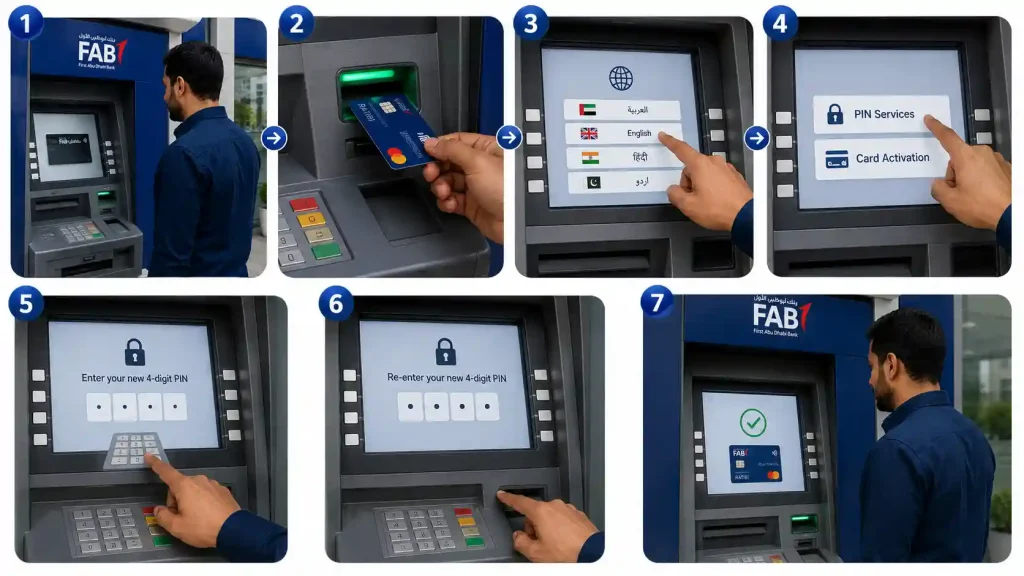
Method 1: Activate Ratibi Card at a FAB ATM (Most Reliable)
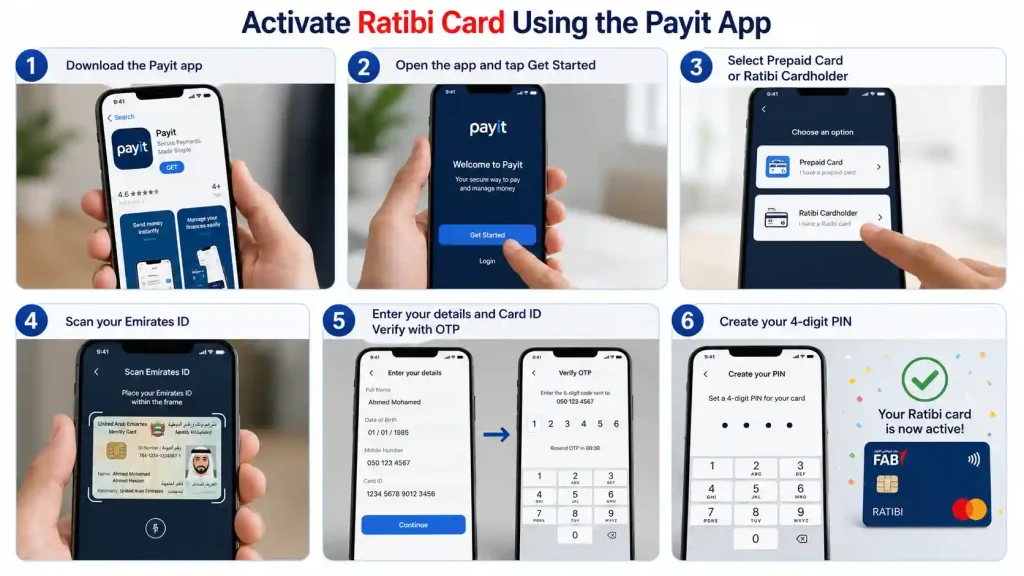
Method 2: Activate Ratibi Card Using the Payit App
Method 3: Activate Ratibi Card at a FAB Branch
Visit any FAB branch with your card and Emirates ID. Staff will activate it for you.
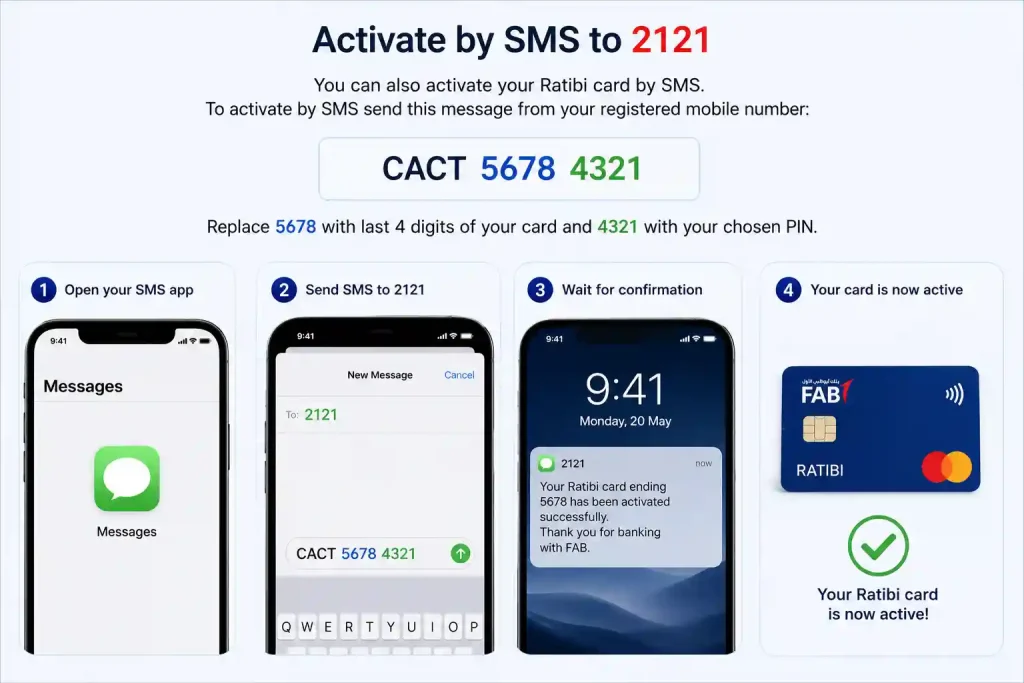
Method 4: Activate by SMS to 2121
CACT 5678 4321
Method 5: FAB Mobile Banking App
Some Ratibi cardholders may be able to activate through the FAB Mobile Banking app. The official FAB Ratibi page does not list this as a confirmed channel for prepaid cards, so treat it as an additional option rather than a primary one.
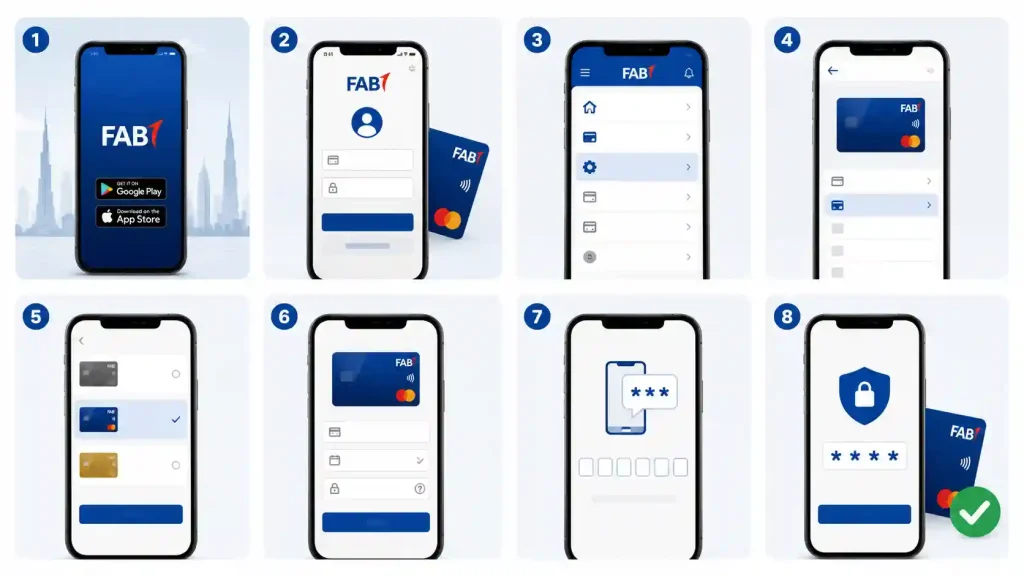
If your Ratibi card does not appear in the FAB Mobile app, use the ATM method or Payit app instead.
Common Problems and How to Fix Them
Never share your PIN or card details with anyone. FAB will never ask for your PIN by phone or WhatsApp.
Card ID vs Card Number: What Is the Difference?
Many workers confuse these two numbers. Understanding the difference saves a lot of frustration.
Keep your card carrier safe. The paper envelope contains your Card ID. You will need this number every time you check your balance online.
What to Do After Activating Your Ratibi Card
Once your card is active, do these things straight away:
Frequently Asked Questions
How do I activate my new FAB Ratibi card?
The easiest way is using a FAB ATM. Insert card, choose PIN Services or Card Activation, set your 4-digit PIN.
What is the difference between Card ID and Card Number?
Card Number (16 digits) is for ATM and shopping. Card ID (13 digits) is for checking balance on Magnati portal.
Is Ratibi card activation free?
Yes, activation is completely free through all official methods.
Can I activate Ratibi card through Payit app?
Yes. Download Payit app, select Prepaid/Ratibi card, scan Emirates ID and follow the steps.
What should I do if my card is damaged?
Do not activate it. Contact your employer immediately for a replacement card.
How long does activation take?
ATM activation is instant. Payit app takes 10-15 minutes. Branch takes 15-30 minutes.
Can I use the card before activation?
No. You cannot withdraw money or make payments before activating the card and setting PIN.
Conclusion
Activating your FAB Ratibi Salary Card is simple if you follow the steps properly. The **FAB ATM method** is the easiest and most reliable for most workers.
Always contact your employer or HR department first if you face any problem. Keep your Card ID safe and remember your PIN.
Once activated, regularly check your balance using Magnati portal or Payit app. This will help you manage your salary better and avoid unnecessary stress.
Stay safe and never share your card details with anyone.
Need help? Call Ratibi helpline: 600 52 2298
All information in this article has been verified against the official FAB Ratibi page at bankfab.com as of May 2026. This site is not affiliated with First Abu Dhabi Bank (FAB) or Magnati.